A former employee’s key is still in a desk drawer. A contractor needs access before opening hours. One office door lock sticks every morning, and no one is certain who has the spare key. These are everyday problems behind the future of office access control. The goal is not to fill an office with complicated technology. It is to make entry safer, easier to manage, and less disruptive when something goes wrong.
For office managers and business owners, the best access system is one that matches how people actually work. A small professional office has different needs from a shared workspace, clinic, retail back office, or warehouse. The right setup should protect people, equipment, documents, and restricted areas without making staff wait at the door or depend on one person holding every key.
Why Office Access Is Changing
Traditional keys are still useful. They are affordable, familiar, and reliable during a power or internet outage. But physical keys create a common management problem: once a key is copied or misplaced, it can be difficult to know who can still enter the office. Re-keying may be necessary after staff changes, lost keys, or a tenant handover.
Modern access control gives businesses more control over this process. Instead of collecting keys one by one, an authorized manager can remove a credential, change entry schedules, or review who entered a specific door. That can reduce risk when an employee leaves suddenly or when different teams need different levels of access.
The change is also driven by flexible work. Offices may have rotating staff, cleaners arriving after hours, delivery teams, short-term contractors, and hybrid employees who do not follow the same daily schedule. A single key system can become difficult to control when access needs keep changing.
The Future of Office Access Control Is Layered
The strongest office security rarely depends on one device. It uses layers that fit the building, the door type, and the risk level of each area. A front glass door may need a dependable commercial lock and controlled entry. A server room, records cabinet, or finance office may need tighter restrictions. Emergency exits must always remain safe and compliant.
For many offices, a sensible future setup combines good mechanical hardware with electronic control where it adds real value. This might mean high-quality door closers and locks at key entry points, supported by keypads, card readers, mobile credentials, or biometric verification for selected areas.
The important question is not whether a system looks advanced. It is whether it solves a real access problem. A small office with five staff members may benefit more from a well-planned master key system than from a costly app-based platform. A larger office with frequent staff turnover may save time and improve accountability with digital credentials.
Mobile Credentials Will Become More Common
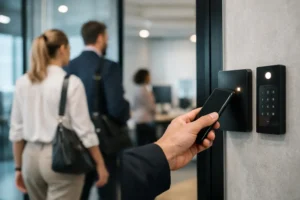
Phones are becoming part of office entry. A mobile credential lets an employee use a smartphone to enter an approved door, much like using a digital boarding pass. For managers, this can make onboarding and offboarding faster because access can be issued or removed without cutting new keys.
Mobile access is convenient, but it should not be treated as the only solution. Phones can run out of battery, be lost, or be replaced. The office should have a clear backup method for authorized staff, as well as a process for reporting a lost device immediately. A good system plans for the normal workday and the unexpected lockout.
Credentials Will Be More Specific
The future of office access control is not simply about replacing keys with cards or phones. It is about giving the right person access to the right area at the right time. A cleaner may need entry to common areas after business hours but not to a records room. A contractor may need temporary access for one day. A manager may need access across several offices.
Time-based access can help reduce the need to hand out permanent keys. It also makes it easier to limit access during holidays, renovations, or lease transitions. However, these settings must be checked carefully. A poorly configured schedule can lock out an employee who needs to open the office early or leave a service provider waiting outside.
Audit Trails Bring Better Accountability
One of the biggest advantages of electronic access systems is the ability to review entry activity. When there is a missing item, an after-hours entry, or a question about who accessed a restricted room, an audit trail can provide useful information.
That does not mean every office needs to monitor every employee constantly. Access records should be used responsibly and in line with company policies and privacy requirements. The practical benefit is accountability. Managers can investigate unusual activity without guessing which key may have been copied months ago.
Audit trails are especially helpful for businesses with sensitive documents, valuable stock, controlled equipment, or multiple shift changes. They can also help identify operational issues, such as a door that is repeatedly forced open because its lock, closer, or latch is not working properly.
Mechanical Security Still Matters
Smart access cannot compensate for a weak door, damaged frame, misaligned latch, or poor-quality lock. Before installing readers, keypads, or electronic strikes, the basic door hardware should be inspected. Glass office doors, aluminum frames, wooden doors, and fire-rated doors all need compatible locking solutions.
A door that does not close properly can defeat an otherwise well-designed access system. Similarly, a low-grade lock on a main entrance may create an easy point of failure even if interior rooms use advanced credentials. Practical security starts with solid installation and hardware that suits the door.
Key alike and master key systems also remain useful options. They can reduce the number of keys a manager carries while keeping selected rooms restricted. The trade-off is that a lost master key may affect more areas, so key control and clear records are essential.
What Businesses Should Plan for Now
Office access upgrades should begin with a simple assessment, not a product catalog. Start by identifying every entry point, who needs access, and when they need it. Include storage rooms, glass doors, side entrances, filing areas, and any shared building access that affects your office.
Consider the cost of day-to-day management, not only installation. A low-cost system may become expensive if it is hard to update, requires frequent service calls, or cannot expand when the business grows. On the other hand, an oversized system can waste money and frustrate staff if only a few doors need controlled entry.
Businesses should also plan for failure. Ask what happens during a power outage, internet interruption, lost card, damaged lock, or emergency lockout. Doors must allow safe exit at all times, and authorized staff should have a reliable way to regain entry without compromising security.
Do Not Forget Physical Key Control
Even offices with electronic access often keep mechanical override keys. These keys should not be left in an unlocked drawer, taped behind a reception desk, or passed between staff without a record. Keep them controlled, label them carefully, and decide who is authorized to hold them.
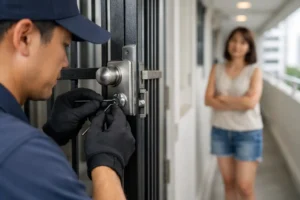
When staff leave, credentials should be removed promptly and keys returned. If a key cannot be accounted for, a locksmith can advise whether re-keying, lock replacement, or a change to a controlled access setup is the safer choice.
Choosing an Upgrade That Fits Your Office
There is no single best office access control system. A small office may need dependable commercial locks, restricted keys, and a clear keyholder list. A growing company may need card or mobile access for the main entrance and a separate lock for sensitive rooms. Larger operations may need centralized management across multiple doors and schedules.
The best choice depends on the building, budget, staff turnover, door material, security concerns, and how quickly the system must be serviced when an issue occurs. Professional installation matters because even the right lock or access device can perform poorly if the door alignment, frame preparation, or exit hardware is overlooked.
When you are ready to upgrade, start with the doors that create the greatest risk or the most daily inconvenience. A well-fitted lock, a controlled key system, or properly installed electronic access at one critical entrance can make a meaningful difference. Good office access control should give your team confidence at the door, not another problem to manage.